Showing posts with label TechEd. Show all posts

Wednesday, 27 November 2013

Helping Children In Need

We have been learning how to give back this month. What I love about these lessons is that they not only combine Language Arts, Social Justice, Math and Technology, but they evoke selflessness and inspire young people to look beyond the latest video game, if only for just a few days, and see the big picture.

I asked students to visualize their bedrooms. They drew pictures of everything they had, adding labels and details such as their favourite comforter, or perfectly placed teddy bear in the middle of their pillows. They used the document camera and enthusiastically shared what they love best about that special room in the house. Whether they shared it with a sibling or their parents, each student felt safe and excited to share their room.

After sharing our bedrooms, I shared some images of children their own age who were not quite as fortunate to have a safe, comfortable place to sleep. I made sure that the images would make an impact, but were also age-appropriate and not be too shocking or upsetting. Students were then asked whether or not it was fair that some children didn't have a safe place to sleep at night.
Unanimously we agreed that it was not fair. I then posed several questions at each table, and gave each student a marker to have a graffiti-style conversation. The rules are: no one speaks, you remain focused on the question being asked, and you respond to the thoughts of other contributors. I couldn't have asked for more engaged, more on-topic conversations. Students were so inspired, that they filled four sheets of chart paper with thoughtful, inspirational suggestions on how they could help those in need.


Some of the ideas were to "invite children to come and stay in your house," to "send a helicopter in with comfy beds," and to "make a youtube video to help raise money."

I made a Shadowpuppet introducing them to Sleeping Children Around the World, (SCAW), a non-profit organization that takes a $35.00 donation and turns it into a bedkit for a child in need. My students were so excited with the concept, that they immediately wanted to spread the word with their own Shadowpuppets. 

Shadowpuppet is one of the easiest, kid-friendly apps I have come across. Students add pictures, and then are able to record their voices over the images to tell a story. It has countless uses in the classroom and at home!

I made an organizer, so that students could plan what they were going to say, and brainstorm 'Google' search terms that they would use to choose images for their puppets. Students needed to include the organization, a description of what a bedkit is, and use some persuasive language.


Check out our Shadow Puppets:

Jessica and Muskaan

Matthew  

Fatiha, Harini and Harani 

Asmiga and Ruhani

Aalam and Jujhar 

Mahwish 

Once we finished our puppets, we made an effort to bring in any change we could find around the house, and spread the word about children in need. Each day, students would count the money, and add it to our thermometer. We were learning how to add money, and what better hands-on way, then to count up for a worthy cause?


Some students went further, and created Pic Collage posters to advertise SCAW and how people can help those in need. This was also a modification for students who needed fewer steps and a more structured model. We posted all of their creations onto our blog.

 Pic Collages


Using Haiku Deck To Teach Each Other About Pioneers

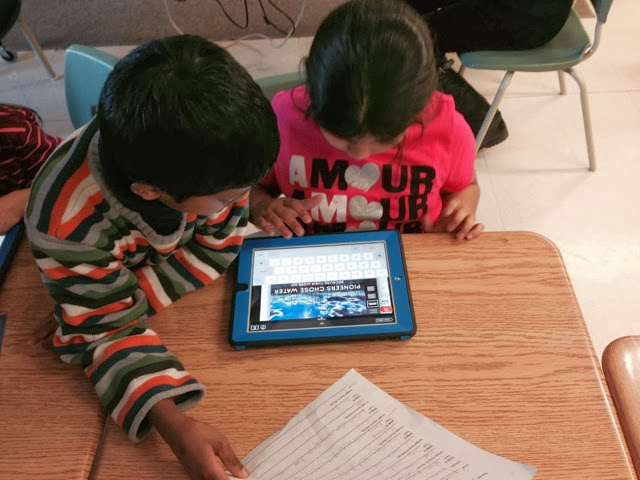
With a partner or a small group, students chose a topic about what life was like for pioneers making their way to Canada. Students used the research in the classroom to help look for important ideas. They recorded the main points as jot notes onto paper.

They then used an organizer to come up with two statements (a title and a subtitle), that could summarize each important idea. They could create as many of these as they felt necessary.

Students then, searched the internal web of Haiku Deck, using search words related to their topics in order to come up with relavant pictures to match their slides.  They assembled their slideshows on Haiku Deck with ease.

Haiku Deck is a free app, that allows students to summarize their thinking and make simple presentations using beautiful royalty free images. It's a great presentation tool, that is extremely easy to use, and introduces students to creating 'to-the-point' presentations.


Students then practised presenting their information, making sure to expand on the information in the slide, and to not just read what's on the screen (a pet peeve of mine during presentations).


After many rehearsals, students presented their polished Haiku Deck's to the class.


Tuesday, 12 November 2013

Student Led Conferences and QR Codes

It was great to see my students take the lead and guide their parents through student conferences. We thought it would be fun to liven the conference up a little and add some tech to our classroom tour. Students wrote speeches, sharing what they had learned about a particular topic, or explained an activity in our classroom.

We recorded their voices using Audioboo, an app that allows us to share a link to our voice recording. We then used QRstuff to change the link into a QR code. We printed the codes and hung them around the room. Anyone with a device could scan the codes that link to students voices. We used Quick Scan on our ipads to scan the codes.

I added the links to the pictures.

Welcome to Our Classroom


Comparing Homes


Alien Recounts


Warm and Cool Colours


Aboriginal Dot Paintings


The Villages

Tuesday, 22 October 2013

Teaching and Learning with Shadow Puppet

We have been having way too much fun using Shadow Puppet in our classroom. We have used it to share and organize our research and create a presentation, and more recently to tell a fiction recount. Some students work best choosing pictures first and then brainstorming the story, while others work well with an organizer, planning what they want to say and choosing the pictures to go along with their words. Having some sort of a script made for a better told story!

Harini and Ruhani tell a fiction recount: The Day I saw A Ghost

Jessica and Josephine share what they learned about how the Wendat people preserve meat and fish

Harshit and Matthew discuss How the Wendat People Used Corn

Coming soon:

Josephine, Aaron and Nathan's fiction recount: The Day A Zombie Came To School http://get-puppet.com/s/6787F2FF-4100-4A2F-A57C-6949F1FF51FC


We're a little excited for Halloween. Can you tell?

Wednesday, 16 October 2013

Hands On Math Centres

I find it challenging trying to create a math program that is an equal balance of inquiry and exploration without completely abandoning the writing component to math: solving math stories and equations on paper. I try to do a mix of hands on problem solving with partners, in groups and independently, as well as exploring centre games and activities. We start each morning with our arrival activities which are generally math oriented based on what strand we are currently learning. I also try to incorporate as many math centres as possible. These centres are pretty low-maintenance. Many can be completed with number cubes, playing cards and paper and pencil. The ipad centre was my first math tech centre, borrowed from the wonderful Mrs. Wideen.

Many of the games and activities I have in my bins and centres I have borrowed from other fabulous teachers I have met either in person or through endless google searches. Today we explored addition and subtraction in 5 hands on centres!

Centre 1 "Race to a Unit"
This centre came from my fabulous grade three teaching partner. She originally introduced me to this game as "Race to a Flat" where students roll a number cube and trade in their ones for rods as they add up to 100 (a flat). In "Race to a Unit," students do the opposite. They start with a flat and subtract each number they roll. Now they are trading the flat in for rods, and the rods in for units as they try to get down to 1. Great way to introduce borrowing!


Centre 2 "Find the Missing Number"
This centre requires 3 players and 1 leader. We decided that Aces would be worth 1, and Jacks, Queens, and Kings are worth 10. The players are each dealt one card that they don't look at. They hold the card up to their foreheads facing out. The leader calculates the sum, and tells the players. The players look at their opponents cards and try to figure out what number is on their heads by using the sum and adding, counting up or subtracting.


Centre 3 "Roll up to 50"
Here, students start with 0. They roll a number cube and add the number to their total each time. The first person to add up to exactly 50 wins! However, if you go over, you have to start again! The fun never ends!


Centre 4 "Make the Greatest Difference"
We have played this game with addition as well trying to find the greatest sum. We used UNO cards. Students are dealt 4 cards and need to create two 2-digit numbers. The goal is to arrange the numbers, so that when they are subtracted, they are left with the greatest difference. The student with the greatest difference gets a point. Students learned that they needed to create a large number on top and a small number on the bottom. Wild cards were free cards. Students could make them be whatever number they wanted (9's and 0's became popular choices as the game caught on).


Centre 5 "Fact Family Stories"
This activity comes right from Mrs. Wideen's Blog. Here students drew a fact family card, took a picture of it, explained it on the ipad using Educreations. They uploaded their Fact Family Stories to Kidblog.


When I can figure out how to attach documents, I will add the instruction sheet.

These were done well. We had issues with the technology, that slowed things down a little. I had to continually log in and out of my Educreations account in order to save and get a link to their Fact Stories. It was somewhat of a nuisance, and meant that the students couldn't do it independently, but overall, I'd do it again.

Monday, 7 October 2013

Bringing Open House Home With Shadow Puppet

So Open House was this past Thursday and the turnout was great! Students brought their parents, siblings, grandparents and neighbours to visit the class, meet the teacher, and explore the school.

We talked as a class the days before in the attempt to ensure as many students would be excited to bring in their families as possible. In one of these discussions there was one little tug on my sleeve the day before telling me that her mom couldn't make it to Open house.  She had to work, so would it be ok if she came tonight instead? 

Now as keen as I may be, I wasn't able to stay that evening as well, so we had a dilemma. My student really wanted to show her mom around, and talk about all of the activities that she had created, but the timing wasn't going to work. I didn't want her to miss out on the opportunity to show off all of her hard work.

Enter ShadowPuppet. 

This has to be the easiest app to use. I gave my phone to my extremely trustworthy student who took pictures of the work she wanted to show. Then with a 30 second lesson, she spoke about each piece of work, recording her voice as she flipped through the pictures. The result? A personal portfolio with student commentary that I was able to e-mail to her mother! Amazing. 


Sunday, 29 September 2013

A Technology Inspired Adjective Lesson

This lesson sort of transpired organically. I had been introduced to wordle over the summer, and was interested in using it in the classroom.

Wordle is an easy to use website that takes text and transforms the words into a colourful word cloud. 

First we talked about what an adjective was. Kudos to the grade 2 team as hands around the computer lab shot up to inform me that adjectives were colours and words like big, small, fat etc.,

So we defined adjectives as descriptive words that describe nouns. We brainstormed all of the different ways we could describe a noun. Then we talked about Terry Fox, as we were raising money for the upcoming walk and were learning a lot about Terry's accomplishments. We came up with all the adjectives we could think of to describe Terry (brave, strong, courageous, caring, thoughtful). We learned that if we wanted a word to be bigger in the cloud, we needed to write it more often. 

I told students I wanted them to envision themselves and come up with all of the adjectives they could think of to describe themselves. They wrote their names often so it would show up bigger.